

Windows 7 introduced a feature dubbed “Aero Shake” that allowed users to minimize all open windows except the one they were working on. That feature is still available in Windows 11, but it’s now called “Title bar window shake” and is disabled by default.
I’m often working with multiple windows open and have always found that feature to be useful, so I have enabled it on my Windows 11 systems. Here’s how:
How To Enable Title Bar Window Shake
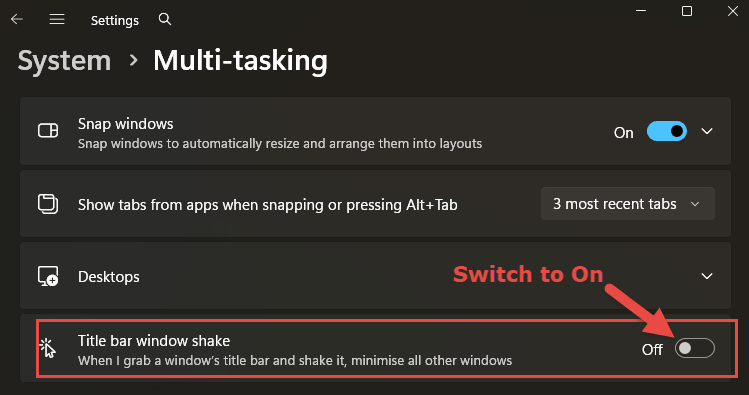
- Navigate to Settings > System >Multi-tasking
- Move the Title bar window shake switch to On
How To Use Title Bar Window Shake
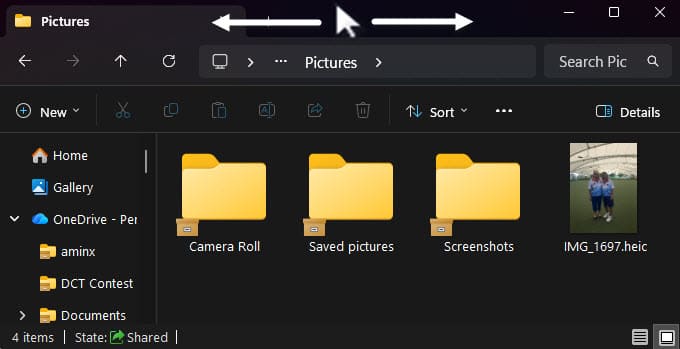
- Move your mouse cursor to the title bar of the window you want to remain open
- Hold down the left mouse button and quickly move the mouse cursor left and right several times
- All other windows should now be minimized
- Shake the window again to restore the minimized windows
BOTTOM LINE:
For a long time I thought Microsoft had removed this feature, and I was happy to discover that it is still available and merely requires enabling.
How about you, do you use the title-bar-shake method?
—
