

Brave Origin is a new minimalist version of the Brave browser that Brave is offering for $60. It is currently available as a “Nightly” version, but should be available as a release version soon. The Origin version removes (or disables, depending on your upgrade path) the revenue-generating features that otherwise support the Brave browser. Brave Origin is available in two flavors:
- A standalone browser download on your device
- As an upgrade to the existing version of the Brave browser on your device
Both versions will be available for purchase at https://account.brave.com/, and a single purchase will give you access to both options.
What Features Are Removed In Brave Origin?
Brave Origin will include Brave Shields, but the following features will be removed (or disabled):
- Leo
- News
- Playlist (currently iOS only)
- Rewards (which also disables browser-based Brave Ads)
- Speedreader
- Stats like the daily usage ping, crash logs, and privacy-preserving product analytics (P3A)
- Talk
- Tor
- VPN
- Wallet (which also disables Web3 domains)
- Wayback Machine
- Web Discovery Project
The Brave Origin standalone app will remove these features. Existing Brave browser users who upgrade to Brave Origin will have a Settings panel that will have an on/off toggle button for these features.
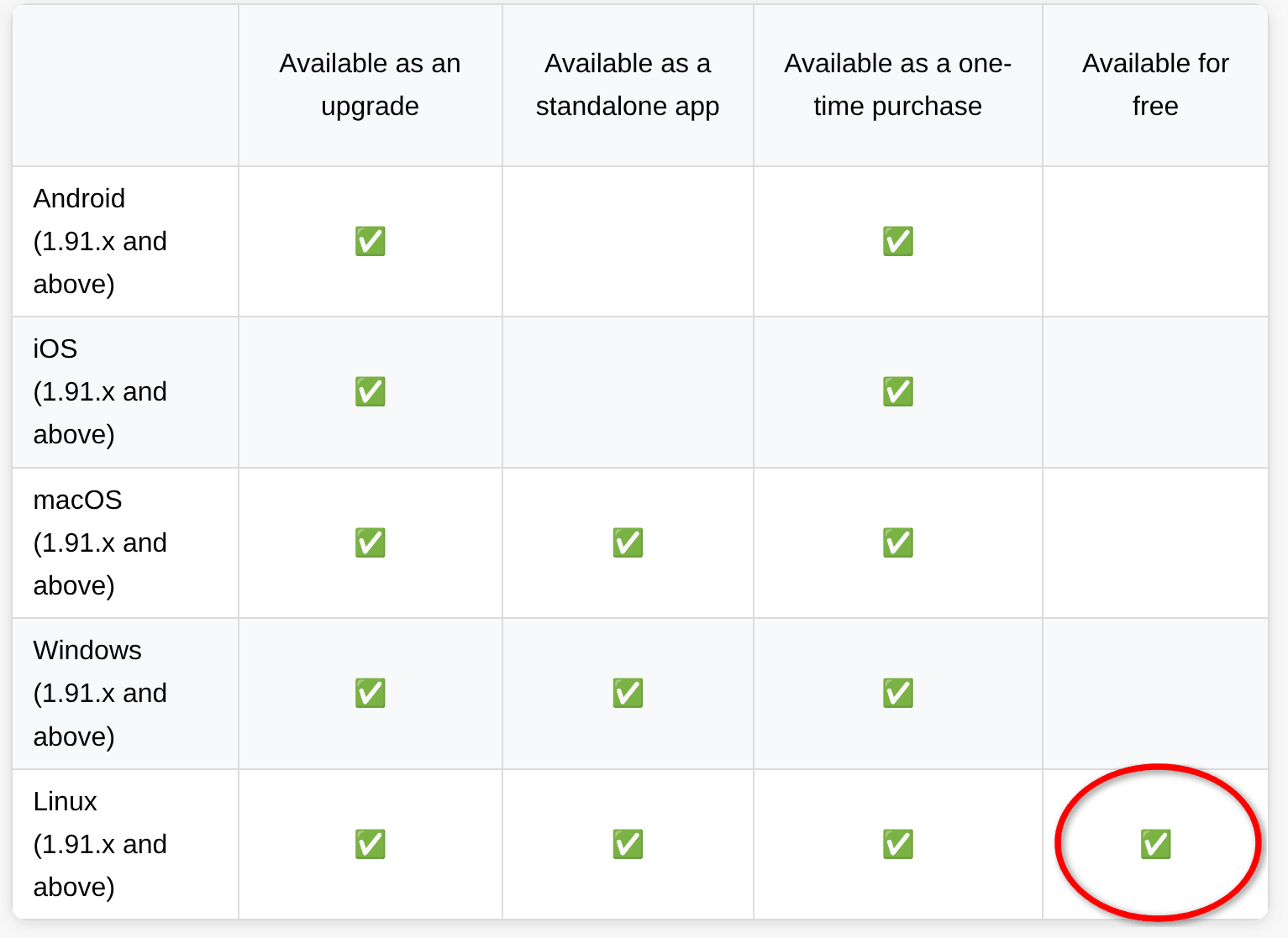
Free For Linux!!!
Brave Origin is available via a one-time purchase, but the standalone and upgrade versions have different availability on different operating systems. Origin is also available for free for Linux users (although you can still pay if you want to support Brave). Yet another reason to consider switching to Linux.
How To Use Origin As A Standalone App (Desktop Only)
Download Brave Origin for your desktop device, complete the installation, and pay for it (it includes 10 installs). You will receive a purchase ID. Open the Brave Origin app and enter the purchase ID.
Linux users should download and install Origin, then click the Proceed with Origin for free on Linux button.
How To Use Origin As An Upgrade
Existing Brave Browser users can click ☰ Settings, click System, scroll to Brave Origin, and click Buy now. You will be taken to the Brave Premium account site, and complete your purchase. Click Refresh Origin on the account page. The Brave browser will restart. Open the main Settings menu again, and click Brave Origin.
Now you’ll see a new control panel in the Brave Settings menu. Features will appear here and be toggled off by default.
Linux users can skip the purchase process and upgrade to Origin for free by clicking Proceed with Origin for free on Linux.
To Upgrade On Mobile
Tap “⋮” (Android) or “…” (iOS), tap All Settings, scroll to General, and tap Origin. Tap Buy now to be taken to the Play Store or App Store. If you’ve already purchased Origin, click Get a Login Code instead. Now, restart the Brave app. Open the main Settings menu again, and tap Origin.
You should now see the panel where you can toggle features on/off.
Bottom Line (My View)
This is a good way to support Brave software if you would like to keep a privacy-focused browser around. It is also a good way to get a browser that is preset with high privacy settings. If you choose to do this, I would suggest choosing to upgrade the original browser. The original browser upgrade path will give you the option to toggle on any feature that you may find useful. Also, you can have both the original Brave browser and the Brave Origin browser on your system if you have that need. The standalone application may be more useful for companies or other organizations, though.
You do not need to purchase Brave Origin to get most of what is offered here, however. One can go through the original Brave browser and toggle off or on these settings.
Let me know in the comments your thoughts on Brave Origin.
—

Thanks for the FYI.
I got to thinking -all the way back to the days of original Netscape- and a question popped-up: ” Have I ever paid for a browser?”
My concern is it only has ten installs. I’ll probably install windows + apps another 100 times in my lifetime!
Plus the portable version of brave is the best for for my needs anyway, especially with the automatic updater from GitHub.