

Microsoft is going to auto-enable the Memory Integrity security feature on all supported Windows 11 PCs, and I’ll outline what this might mean for you.
Memory Integrity is a security feature in Windows that ensures only verified kernel-mode code is loaded, blocking unsigned rootkits and enhancing protection against driver-based kernel attacks.
Memory Integrity has been a component of Windows Security for some time but has been largely disabled; you’ll find it under Windows Security > Device security > Core isolation:
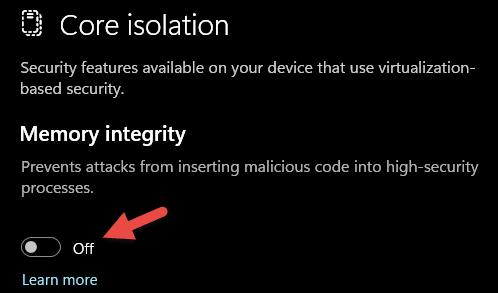
However, from October 2026, Memory Integrity will be enabled by default on all PCs that meet the criteria, which includes pretty much all relatively new machines.
Memory Integrity Requirements:
- 8th-generation Intel processor or newer
- AMD Zen 2 or newer
- Qualcomm Snapdragon 8180 or newer
- At least 8GB of RAM on x64 systems
- A 64GB SSD with firmware-enabled virtualization
- Drivers with confirmed Memory Integrity compatibility
This news has divided opinions among users, with some praising the additional security while others rail against Memory Integrity’s additional hit on resources, particularly for gaming.
Should You Disable Memory Integrity?
The consensus among tech pundits is that, once Memory Integrity has been enabled, it should be left enabled. However, I tend to disagree.
Firstly, once again, as is the case with Secure Boot and TPM, this type of security measure is largely for the benefit of corporate deployments and not so much for your average home users. Indeed, I’ve been running Windows 11 for years with Memory Integrity disabled and have suffered zero repercussions.
Secondly, users who are against enabling Memory Integrity point out the additional RAM overhead it causes, with significant numbers to back up their claims.
On the other hand, users who are all for enabling Memory Integrity quote the emergence of AI as a serious malware threat in their reasoning.
Of course, in the end, it’s entirely up to each user to decide, and the amount of RAM installed per machine plus each user’s level of gaming will no doubt influence that decision.
BOTTOM LINE:
I find it difficult to overlook the fact that almost all malware, regardless of its origins, cannot deliver its payload without direct access. In almost all cases, it requires some sort of assistance from the end user.
So, for me anyway, maximizing my meagre 16 GB of RAM trumps any security benefits that enabling Memory Integrity might or might not deliver.
—
