
I’ve long considered that security requirements depend largely on the user’s level of computer competency. That is, advanced users tend to be more security-savvy and don’t generally require as much protection from themselves as (say) novice users do.
That said, let’s examine whether Microsoft Defender provides good enough protection.
As far as malware protection is concerned, I believe that the ongoing lab tests performed by AV-TEST have now proved that Microsoft Defender is right up there with the best Premium antivirus offerings. Here’s Microsoft Defender’s test results for the months of July and August 2026:
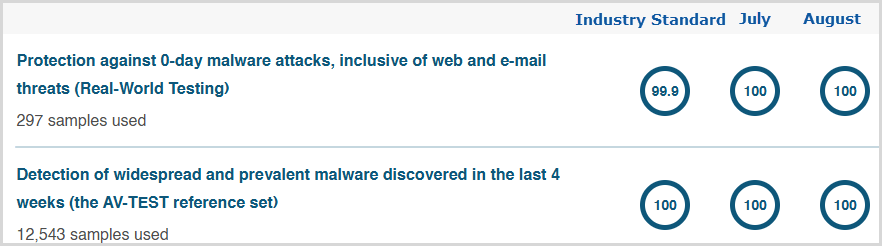
You can’t do much better than 100% across the board.
I guess the main difference between Defender and Premium antivirus solutions is that the latter often includes additional security measures, but don’t forget about the additional security features built into Windows, such as SmartScreen and Windows Firewall.
Out of interest, here’s a rundown of the additional protections provided by those built-in security features:
SmartScreen Protects Against
- Phishing attacks
- Malware websites
- Malicious downloads
- Untrusted or low‑reputation apps
- Drive‑by exploits
- Potentially unwanted applications
Windows Firewall Protects Against
- Unauthorized inbound access
- Malware scanning the device
- Remote exploitation of services
- Malicious or suspicious outbound connections
- Unauthenticated devices connecting
- Packet sniffing
- Risks from public Wi‑Fi networks
It’s clear then that, with Microsoft Defender’s excellent malware protection together with those additional protections, the standard Windows defenses are quite substantial.
BOTTOM LINE:
I wouldn’t make a blanket statement that Microsoft Defender is good enough for all users, but I will say, with some confidence, that it is certainly good enough for the majority.
Are you using Microsoft Defender or one of the alternative 3rd-party antivirus offerings?
—

Thanks Jim
Everything I read suggests that Microsoft’s AV is enough for the average user. If you are a user that is traipsing through the Russian Dark Web or running pirated games from Pirate Bay then probably the paid offerings may have a slight edge but even that is debatable. Steam users (who presumably were mostly running just the Microsoft product) got hit not so long ago with fairly sophisticated malware which even attracted the attention of the FBI. It didn’t help that many gamers whitelist Steam directories so that they are not scanned to avoid frame drops during virus scanning. However everything suggest that the private AV companies didn’t perform any better. The biggest issue for all users is when malware is designed to run looking like legit and/or already approved Windows software and when it uses windows processes to do it’s thing – that trojan horse behaviour is something that can get through the standard defences as the Greek legend would have us believe.
At the end of the day whether you rely on private antivirus or the built-in offering (I use Norton on my main machine but Microsoft only on my games machine) you need to still be alert and careful as to what you download/run/open as well as always keeping software up to date.
Cheers
Reg
Somewhat related issue to this article, I few days ago after reading your article on the Pros & Cons of installing Microsoft’s 26H2 I went ahead and updated. One issue I ran into is the change to the Smart App Control function and that is you can no longer freely turn it off and then back on without reinstalling windows or as it stated the next update would re enable Smart App Control.
Hey Robert,
Yes, that’s a known bug. In order to bring back the option to enable Smart App Control again you need to make a couple of registry changes.
I’m unable to give directions via a comment but we’ll be publishing an article next week with step-by-step instructions.
Thanks Jim, I know I could probably find that on the internet but I’ll wait for your article as I’m in no hurry.
I use Defenderand Malware Bytes
A very good combination David.
Jim,
Is it true that the online protection of Microsoft Defender is only available when you use Microsoft Edge? I use Brave and the free Bitdefender.
Stu Berg
Hey Stu, nice to hear from you.
No, that’s not true. Defender protects against malware regardless of the browser.
Maybe you’re thinking of the SmartScreen feature which only provides full protection in Edge. However, it still provides network protection and web content filtering for most mainstream browsers.
Cheers… Jim
Hi Jim. I use a 3rd party for my online protection, which adds protection against Ransonware, Intrusion, Stalkerware detection, a Password Manager, and a host of other features, such as allowing you to use it on upto 10 devices, Mindblower!
Great topic Jim. I always used to have Norton or McAfee and found that it slowed down my computer and made simple downloads from friends and family difficult. Over the last 5 years I’ve stuck to Windows Defender with no issues but until your your article I was always a little concerned whether it was good enough.
You’re most welcome Lucio.
Many years ago I used Norton, when it was often offered up as a free 3-month trial on new PCs, and it used to slow my PC to a crawl. Needless to say, it didn’t last the 3 months.