

It’s something most of us have experienced at one time or another: you either go to shut down or restart the system only to discover that updates are now installing. It doesn’t happen often, but it sure is frustrating when it does.
In my experience, once updates are pending a restart, the “pause” function no longer works. However, some methods will allow you to shut down or restart immediately while skipping any pending updates. Both methods are achieved via simple Run commands.
- You also might like: 2 Little Known Windows Tricks
How To Shutdown Without Installing Updates
To shut down the system immediately and skip pending updates:
- Open a Run command box (Windows key + R)
- Type in the following command: shutdown /s /f /t 0
- And click OK or press Enter
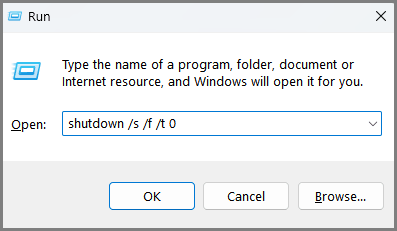
The command parameters perform the following functions:
- /s shuts down the system
- /f forces running applications to close (so make sure to save any work-in-progress beforehand)
- /t 0 sets the time period to shut down at zero seconds (so the shutdown occurs immediately)
How To Restart Without Installing Updates
To restart the system immediately and skip pending updates:
- Open a Run command box (Windows key + R)
- Type in the following command: shutdown /r /f /t 0
- And click OK or press Enter
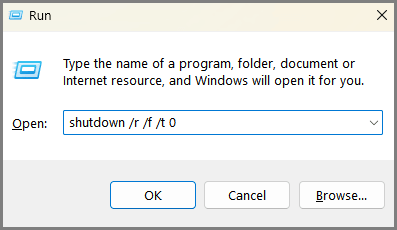
The command parameters perform the following functions:
- /r restarts the system after shutdown
- /f forces running applications to close (so make sure to save any work-in-progress beforehand)
- /t 0 sets the time period to shut down at zero seconds (so the restart occurs immediately)
BOTTOM LINE:
This is something you’ll need only occasionally, but on those odd occasions, it can be a useful method to shut down or restart quickly without needing to wait for updates to install.
—

Thanks Jim
I’d just add a note of caution to this – if you use this command occasionally when updates are merely scheduled and not actively writing files you’ll probably get away with it. However once they have started downloading and/or installing using force-shutdown commands to dodge updates carries a risk of damaging the Windows Update service or causing boot issues over time.
Cheers
Reg
Yes Reg, common sense dictates that updates should never be interrupted when they’re downloading and/or installing. That’s why I specifically refer to “Pending Updates” throughout the article- meaning updates that are ready to go and only awaiting a restart.