

Microsoft has been promising a movable Taskbar since August, and it’s now finally arrived on my two Windows 26H2 systems.
Microsoft’s policy of rolling out new features “gradually” sure can be frustrating, with months passing between the promise and the reality, but it’s a policy that’s at least attempting to keep bugs to a minimum.
NOTE: I do not recall any recent updates coming through, so I have no idea how this new feature has finally been activated on my systems. Perhaps the earlier (October) enablement update included a designated-date trigger; I honestly don’t know.
How To Move The Taskbar
Unlike previous versions, which could be moved by simple drag and drop, this one requires a little navigation:
- Right-click the Taskbar and then click Taskbar settings
- Expand (click on) Taskbar behaviours
- Click the thumbnail for your preferred positioning
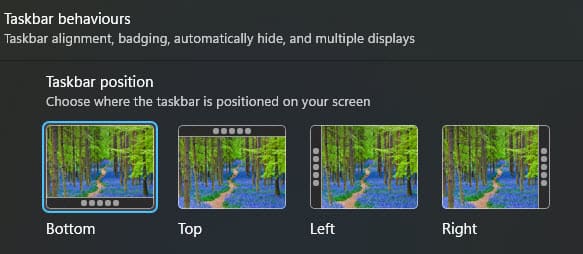
The Taskbar moves to the chosen position instantly and in real time, so you can try out all positions from these settings, with no need for a restart.
BOTTOM LINE:
Ironically, I prefer the Taskbar positioned at the bottom anyway, so not much has changed for me. However, I do know of users who much prefer to position the Taskbar at one of the left or right edges, or at the top, and I’m excited for them.
How about you, what’s your preferred Taskbar position?
—
