

A new keyboard combo has been added to Windows 11, allowing users to copy anything and everything.
I recently received a Windows Insider email message highlighting new features as well as several Windows 11 tips. Among those tips was this keyboard shortcut, which I previously knew nothing about.
Previously, in Windows, copying and pasting has more or less been limited to text and images, but with this keyboard shortcut you can copy and paste from anything; if you can see it on your screen, you can copy it, all or selectively.
How To Copy Anything
The magic keyboard combo is Windows key + Shift + T
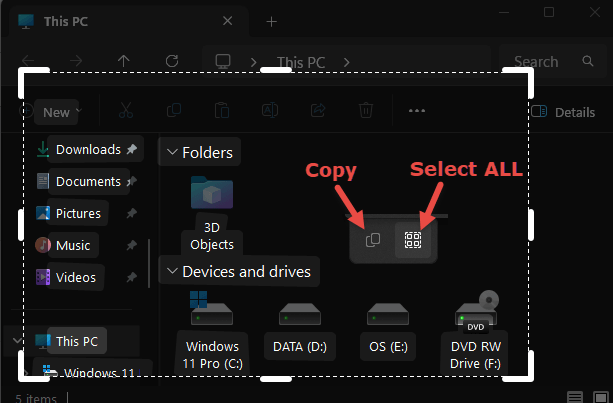
- From there, drag the mouse cursor to highlight the area you want to copy
- As soon as you release the mouse button, the area you selected will be highlighted
- Right-click inside that highlighted area and two little icons will appear
- Click the icon on the right to “Select all”, then click the icon on the left to “Copy”
You can now paste what you copied into whatever.
BOTTOM LINE:
This isn’t exactly a world-shattering feature, but as a long-time Windows user, it sure got me excited.
—

If one opens the Edge pancake settings tab, you will find a “screenshot” tab that will do what “Windows key+Shift+T” does!! Thanks for the heads-up!!
What version of windows are you running? I have this: 25H2 and it doesn’t work.
The same, Windows 11 25H2.
I tested it in multiple different windows and it worked perfectly every time.
Check your build number, perhaps you might be missing an update. Here is my system details as copied from “winver” using this very same keyboard shortcut:
Microsoft Windows
Version 25H2 (OS Build 26200.9168)