

If you’re still running Windows 11 24H2, you need to be aware that, as of October 13th, your operating system is no longer supported.
What 24H2 End-Of-Support Means
Your operating system (24H2) will continue to work as normal past 13th October, but it will no longer receive any updates, including critical security updates. This means that your system will become vulnerable to attacks, more and more so as time rolls on.
How To Check Your Windows 11 Version
To see which Windows 11 version you are running:
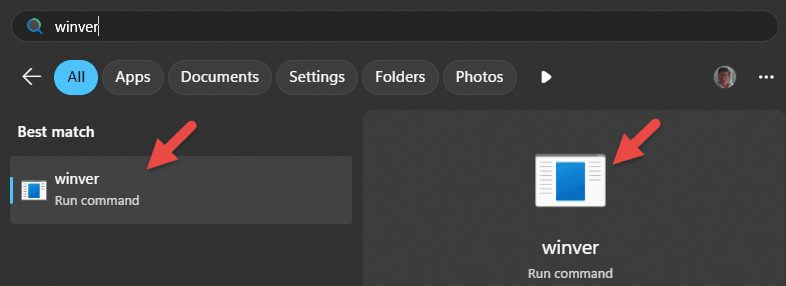
- Open the Start menu and type winver
- In the results, click “winver (Run command)”
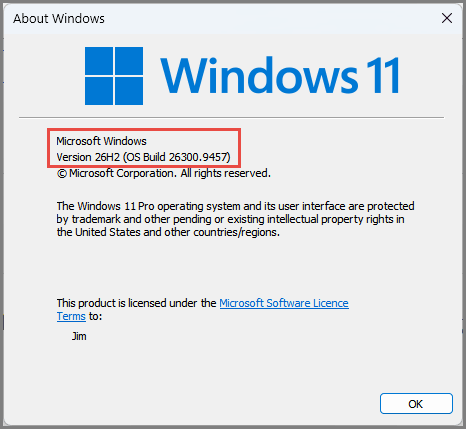
- You should now see your Windows version in the “About Windows” window
- Alternatively, navigate to Settings > System
- Scroll down the System settings to About (which is at the bottom)
- Scroll down past “Device specifications” to “Windows specifications”
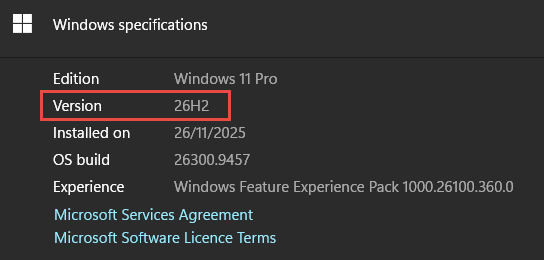
If your version is 24H2, it is recommended that you update asap, preferably to Windows 26H2.
BOTTOM LINE:
Windows 11 24H2 has now reached end-of-support and will no longer receive any critical security updates, so it will become more and more vulnerable as time rolls on. It is recommended that anyone still running Windows 11 24H2 update to 26H2 asap.
—
