

Microsoft has been adding more and more features to Notepad in Windows 11, perhaps in an attempt to compensate for scrapping WordPad. For whatever reason, many users are unhappy that Notepad has been turned into a more sophisticated word processor and would prefer the old, simple, and clean Notepad.
The good news is that you can easily restore Notepad to its former self as a distraction-free, plain-text editor simply by adjusting three settings from within Notepad itself.
Restore The Traditional Notepad
Setting #1: Turn formatting OFF
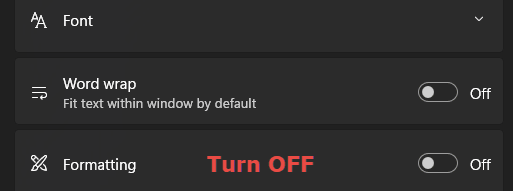
Many users view the lack of formatting as a huge plus, especially when using Notepad for chores such as stripping formatting from web text or compiling clean code. Toggling the formatting setting to OFF will eliminate the unwanted formatting.
Setting #2: Change Notepad’s startup behaviour
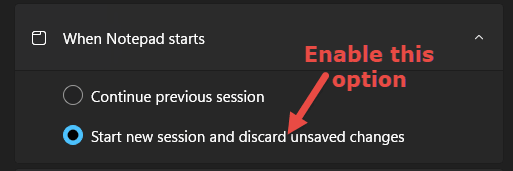
I don’t know about you, but whenever I open a new instance of Notepad, I prefer to start from a clean state. To achieve that, enable the option to Start new session and discard unsaved changes under “When Notepad Starts.
Setting #3: Disable Copilot (AI) features

I am so fed up with Microsoft’s AI (Copilot) everywhere policy; this one is a no-brainer for me. You’ll find the “Copilot” switch at the very bottom of Notepad’s settings, toggle it to OFF.
That’s it, all done. Welcome to the old Notepad.
—

Thanks Jim
Very useful tips. I had gone to the trouble of installing the old version of Notepad on Win 11 as I didn’t realise the new one could be modified like this. It drove me crazy seeing old pastes still sitting in Notepad whenever I opened it. Some things work well for a reason and of all the things they had to take away after so many years of successful use they picked on Wordpad and had to tinker with Notepad !
Cheers
Reg
Too easy. I suspect when MS does an update to Notepad it may reset some of these preferences.
Thanks,
Tom
I like word pad, can it be retrieved. thanks
Hey Shirley,
No, unfortunately WordPad cannot be restored. I suggest you take a look at “Jarte” word processor, it’s based on the same engine as WordPad and there is a portable version available.
https://davescomputertips.com/microsoft-removing-wordpad-from-windows-11/
Download Jarte here: https://www.jarte.com/download.html