

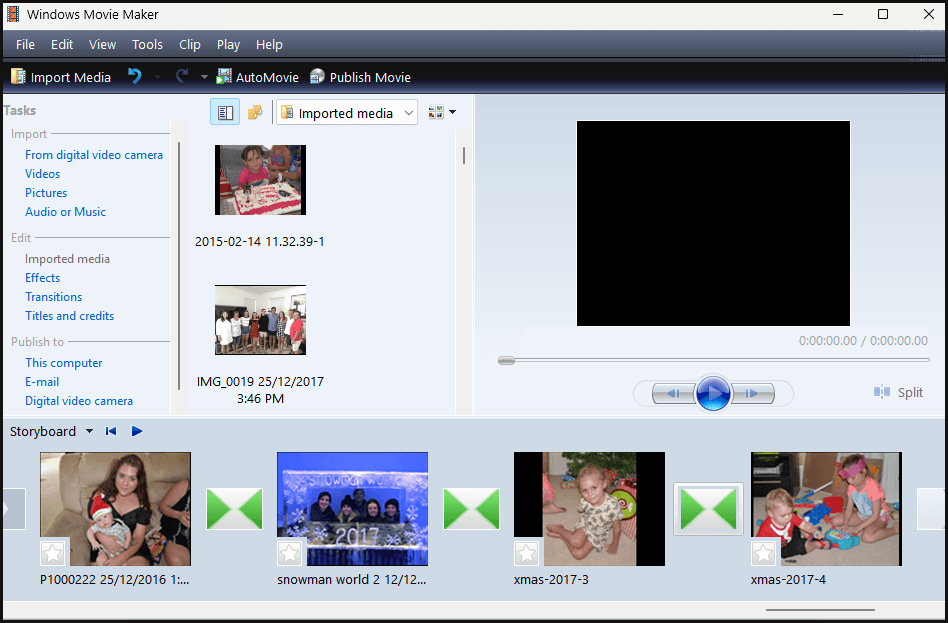
Many users, myself included, mourned the loss of Windows Movie Maker, which was discontinued in 2017. I lost count of how many special-event slideshows I created for family and friends back in the day.
Windows Movie Maker was a classic, lightweight piece of software that excelled at simplicity and ease of use, and Microsoft’s subsequent attempts to provide a suitable replacement video editor have largely fallen flat. Typical Microsoft: abandon a feature that’s both effective and popular and replace it with an inferior offering.
Now, thanks to the efforts of “skylerdagirl“, you can install and run the classic Windows Movie Maker in Windows 10 and Windows 11.
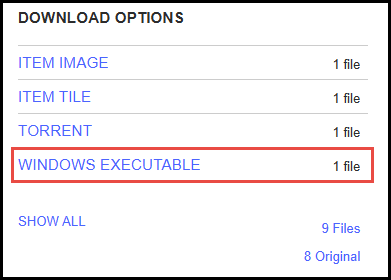
- Download Windows Movie Maker 6.0 setup from archive.org (under “Download Options” on the right, click WINDOWS EXECUTABLE)
I installed it without a hitch in my Windows 11 Pro, and the installation is clean with no bundled extras.
Now, I wouldn’t normally recommend downloading files from a third-party source, but I ran the executable through multiple online and offline malware scanners, and all reported a clean bill of health.
BOTTOM LINE:
When Microsoft abandoned Windows Movie Maker, most users, including myself, were forced to look elsewhere for an effective video editor/slideshow creator, which often meant having to pay for a bloated premium offering.
Now, thanks to “skylerdagirl“, you can safely resurrect this fine piece of free software.
Enjoy!
—

It is also available in England from the Microsoft store here:
https://apps.microsoft.com/detail/9mvfq4lmz6c9?hl=en-GB&gl=GB
Hey Steve,
That is not the classic Windows Movie Maker, nothing like it. The software from the Store is called “Movie Maker” and has been developed by AI Photo Editor Lab. Also, it’s distributed as a freemium model, available in a feature-limited free version plus a full-featured Pro version. Whereas Windows Movie Maker featured in this article is genuine freeware.
I apologise for my mistake.
Absolutely no need to apologise for anything Steve, it’s an easy mistake to make.
virustotal.com detects
Malicious (moderate Confidence)
VirIT
Trojan.Win32.X-PackedGen.AP
You forgot to mention the other 32 more reputable antivirus engines at Virus Total that give it a 100% clean bill of health.
One flag out of 33, and from an unheard of antivirus, is clearly a false positive.
Exactly what is your agenda?
“Exactly what is your agenda?
Calm down old boy!! Don’t Shoot the Messenger..
What do you mean by What is your agenda?
And what is your message exactly Jan? That’s what I’m questioning.
Why would you report what is clearly a false positive unless you have some sort of ulterior motive?
You mention a single obscure antivirus engine that flagged the file while completely ignoring the other 32 more reputable antivirus engines that all give the file a clean bill of health.
What am I supposed to make of that?
Always been a big fan of this program. It suits my basic video editing needs. My version is different from the layout displayed on archive.org. I have version 2012 Build 16.4.3528.0331.
Nice find Jim. I have jumped to a more capable paid program some years ago, but I was looking for this to share with friends in the local photography club.
This was a great program for making good short video presentations of one’s work.