

My contact list is not showing on my Facebook page. Then a woman called with the same problem. Normally, here is what I would suggest when a Facebook page or any other web page doesn’t display properly:
– restart browser
– clear out cache/history
– disable ad blockers
– disable extensions
– update browser
– use another browser
None of these worked this time, and I think I know why. After some online searching, it was suggested that this was intentional. Facebook is making some changes to its interface. If that is the case, you can still access your contacts.
1. The first way is to click the “Messenger” button towards the top right corner of the page. This opens your contacts list.
2. The second way. Down in the right-hand corner is a symbol. Looks like a pencil on a square pad. That will also show you your contacts.
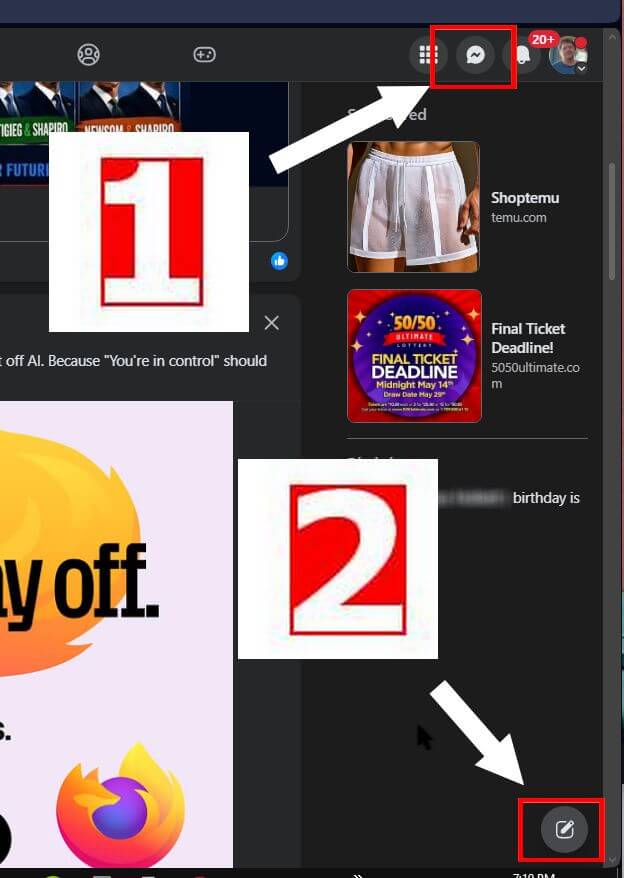
The only thing is, your contact list doesn’t remain open in the background like it used to.
When Facebook rolls out some new changes, not everyone receives them. My sister got hit with the top menus switching to the side of the page. Mine didn’t. So, are you cursed with this change? Let us know in the comments.
Note: I just signed in to Facebook on my Linux Mint laptop using Firefox, and I get the same screen as on my Windows computer.
For more Facebook-related articles, click here.
—
