

Winners Announced!
This contest has now expired. Winners will be notified by email.
Congratulations to the Winners and Thank You to everyone who participated!
AWZ PC Cleaner offers so much more than the name suggests, including a comprehensive set of cleaning and optimization tools.
AWZ PC Cleaner Tools
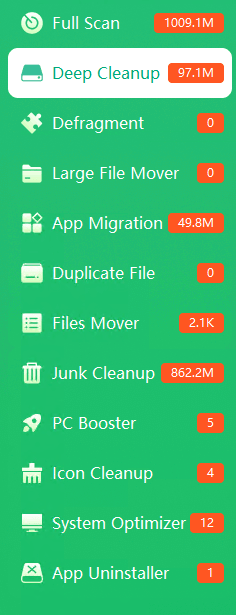
AWZ PC Cleaner’s comprehensive suite provides just about every type of tool required to keep a system lean and clean, including:
*Junk File Cleaner
*Duplicate File Cleaner
*Icon Cleanup
*PC Booster
*System Optimizer
*Uninstaller
*Files Mover
*App Migration
AWZ PC Cleaner Main Features
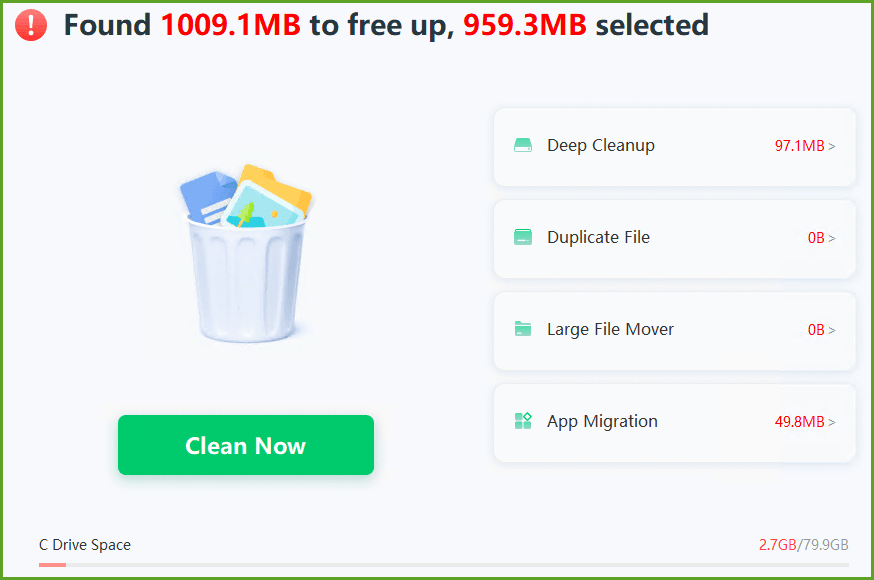
- One-Click Windows Optimizer & Junk Remover
- Optimize Disk Space and Storage
- Clean System Junk Files Safely
- Remove Duplicate Files Instantly
- Boost PC Speed and Startup
- Uninstall Stubborn Apps Completely
**For more details, please visit: AWZ PC Cleaner Home Page
This giveaway contest will run until July 23, 2026.
Good luck to everyone!
—

Jim, I just came across another that claims to be a replacement to CCleaner. The software FluentCleaner was reviewed in Make Use of (https://www.makeuseof.com/open-source-ccleaner-alternative/) and appears to have a lot of bells and whistles.
I am a little timid to try it until I find more about it. It would be nice if another respectable site checked it out.
Hey Tom,
I’ve downloaded FluentCleaner and I’ll check it out.
CCleaner would be the very last junk file cleaner I would ever recommend. PrivaZer is, in my opinion, the best, closely followed by Wise Disk Cleaner.
That said, AWZ PC Cleaner is free and comes with a host of additional useful tools included, also a very good choice.
Hey Tom,
I tried to compare FluentCleaner’s effectiveness against Wise Disk Cleaner but didn’t get very far.
When I ran FluentCleaner I received the message: “Required components of the Windows App Runtime are missing, do you want to download the necessary files?” To which I replied, no thanks.
One shouldn’t need to download an additional compatibility platform in order to open what’s supposed to run natively in Windows.
The version I downloaded was a portable app from
https://github.com/builtbybel/FluentCleaner/releases/tag/26.07.01.
It did not ask me to download anything additional.
When I ran CCleaner many years ago, it scared me by what it found. This app is doing the same thing with the amount of items it found that can be deleted.
I am tempted to run it in Windows Sandbox, but not sure it would answer my concerns about what it says I can remove.
Yep, that’s the same version I downloaded. You must already have ‘Windows App Runtime’ installed on your system. I don’t have any apps from the Microsoft Store so it’s not installed on my system.
Why mess about with an unproven software when there are excellent and effective proven alternatives available?
Jim, Thanks for looking.
As for “AWZ PC Cleaner is free”, yes free to download but you need to purchase it before it will do anything. I tried it but uninstalled it when it asked for a purchase to remove anything.
Hey Tom,
Oh, sorry. When I checked it out earlier I could have sworn the free version included the cleanup function. However, I just downloaded and checked it again and you are correct, a license is required for cleanup. Sorry about that.
You could always enter the giveaway contest and win a lifetime license for the Pro version. You got to be in it to win it. 🙂
Hi Jim. Just checked and I had 4 Windows App Runtime copies, which are now uninstalled. So far I have not noticed any current program requiring them. Thanks for the information, Mindblower!