

DNS (Domain Name System) translates domain names into numerical IP addresses, and it plays an integral role in how we connect to the Internet.
Most users would likely be using the DNS server provided by their ISP, but that is far from ideal. Not only does using the ISP’s DNS server involve privacy issues, but it can also weaken security.
As an alternative, public DNS servers provide more privacy, better security, and can even be faster than the ISP’s DNS server. You can check each public DNS server’s speed by pinging its associated IP address.
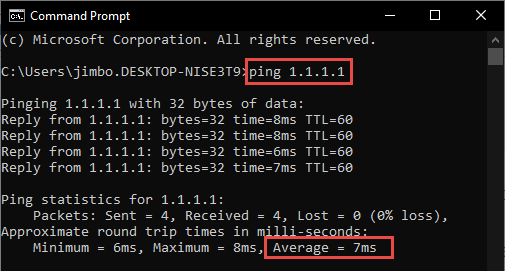
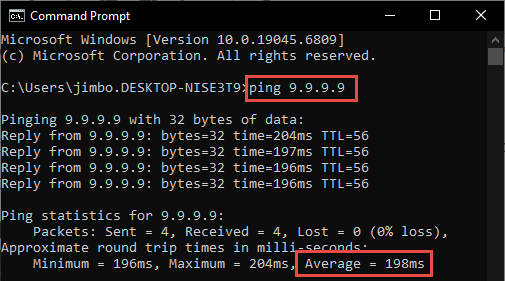
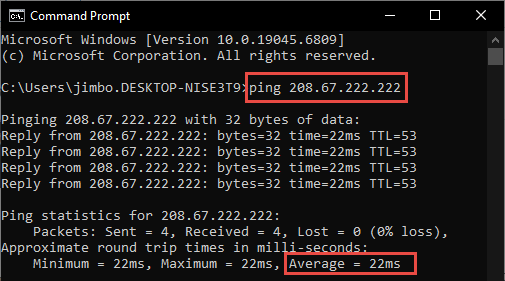
Open a Command Prompt, PowerShell, or Terminal, type in ping followed by the IP address, and hit Enter.
I have listed each public DNS server’s ping time in the article, but you need to remember that this is relevant to Australia only and will differ according to your specific location. Here then are some of the best public DNS servers.
Cloudflare DNS
Is my number one choice in terms of both privacy and security. Cloudflare never records IP addresses and deletes all operational logs after 24 hours, as independently verified. It’s also among the fastest of the public DNS servers.
- Basic: Primary 1.1.1.1
Secondary 1.0.0.1 - Block Malware: 1.1.1.2
Secondary 1..0.0.2 - Block Malware & Adult Content: 1.1.1.3
Secondary 1.0.0.3
Quad9
Quad9 is based in Switzerland. Quad9 never logs IP addresses and is fully GDPR-compliant. It provides security beyond DNSSEC and DoH by blocking known bad websites that harbor malware or harvest user credentials.
- Including malware blocking & DNSSEC validation: Primary 9.9.9.9
- Secondary 149.112.112.112
OpenDNS
OpenDNS has a global presence and provides malware/phishing protection by default. However, its acquisition by Cisco in 2015 has raised serious privacy concerns; it logs all DNS queries, IP addresses, and more. Fast, ultra-reliable, and secure, but privacy issues might be a put-off for some.
- Primary: 208.67.222.222
- Secondary: 208.67.220.220
Google Public DNS
Provides a robust and reliable service with fast response times. Google DNS supports DNS over HTTPS, DNSSEC, and offers some protection against DDoS attacks. Google DNS rates highly for reliability and security, but not so much for privacy.
Everyone knows (or should know) about the privacy issues with Google. However, if you’re already active in the Googlesphere – using Gmail, Google search engine, Chrome, etc. – it’s doubtful that Google will learn more about you than it already knows.
- Primary: 8.8.8.8
- Secondary: 8.8.4.4
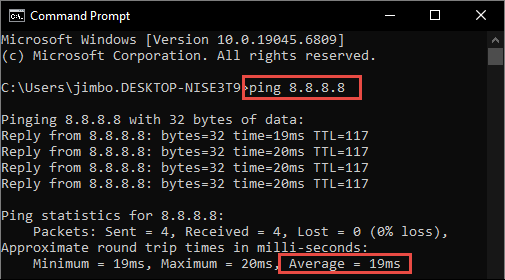
A note on ping times: As mentioned earlier, these will differ according to your location. However, it’s important to note that ping times are recoded in milliseconds, so the difference between (say) 10ms and 20ms will be barely noticeable. Speed is a consideration, of course, but shouldn’t take precedence over privacy and/or security.
BOTTOM LINE:
In my opinion, as far as public DNS servers are concerned, it’s difficult to go past Cloudflare.
—

Thank you Jim for recommending Cloudfare. As an AdGuard user, I was unaware I could switch my DNS to Cloudfare. Appreciate this information, Mindblower!
I have 1.1.1.1 permanently etched into my memory but 2606:4700:4700::1111 (IPv6) is a bear to remember.
LOL. Yep, those IPv6 numbers are a pain.
Which DNS application would be better, configuring the DNS in your Router or Windows Operating system?
,
It depends. Via the router means that multiple network connected devices will all be using the same DNS server. Via Windows means that only that single device will using the DNS server.
If you’re only concerned with the PC, via Windows will be just fine.
This is a free tool to check which might be the best DNS servers, and I think you had profiled this before on DCT – https://www.grc.com/dns/benchmark.htm
Yes Robert, we sure have: https://davescomputertips.com/are-you-using-the-optimal-dns-server/
Those were the good-old-days!
Steve
Gibson is now charging $10 for version2.0… further explaining that v1. is “wrong” (re: Today’s networks).
I wonder Jim : will the change of DNS have an influence on the functioning of my printer?
Changing the DNS server will not affect a printer’s operations at all. You can change the DNS server and your printer will keep functioning as normal.
Thanks Mike ! I dis the change then with DNS Jumper another tool that you have already talked about in the past too.
Version 2 of Benchmark seems to be paid now.
You are correct Belga, DNS Benchmark v2 costs $9.95us for a lifetime license. However, it is has been hugely improved to match today’s Internet and associated protocols.