

Microsoft released Windows 11 update KB5083769 around the middle of April, and it has caused a number of serious issues, the latest of which is that it’s breaking third-party backup programs that rely on the Volume Shadow Copy service (VSS).
Those 3rd-party backup programs affected to date include Acronis, Macrium, NinjaOne, and UrBackup Server. However, I can add another to that list, namely Aomei Backupper.
I recently attempted to create an image backup with Aomei Backupper Pro but ended up with a Black Screen of Death instead, with the message “What failed: volsnap.sys“, which is a critical system file that drives Volume Shadow Copy.
At first, I put it down to possible system file corruptions, but a scan using the command sfc /scannow reported zero issues, so I turned to an online search for help and discovered that update KB5083769 was causing the problem.
Update KB3083769 has also been problematic for some users, causing issues such as BitLocker lockouts, unexpected reboots, and a Remoter Desktop bug. At this point in time, it is not known if Microsoft is working on a fix or when a fix is likely to be released.
*If you want full control over Windows Updates, including selectively installing updates, hiding and unhiding updates, etc., you need to read: How To Take Full Control Of Windows Updates
Fix Issues Arising From Update KB5083769
As a temporary workaround for those affected, it is recommended to uninstall update KB5083769, which you can do by navigating to Settings > Windows Update > Update History, then scrolling down to Related Settings and clicking Uninstall Updates. Locate KB5083769 and click the associated Uninstall button.
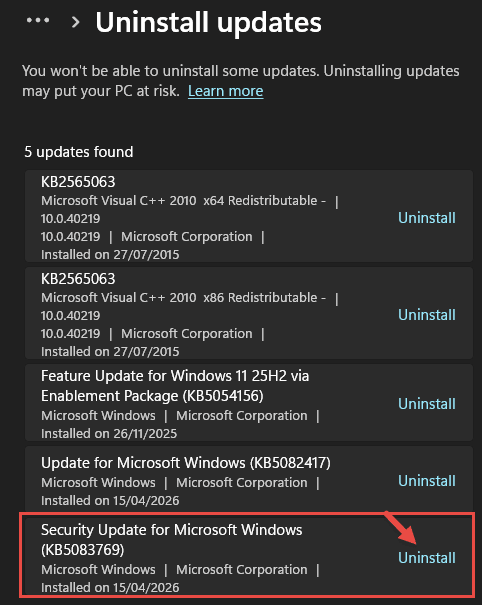
Once you’ve done that, pause Windows Updates and restart the system.
BOTTOM LINE:
This is yet another buggy update from Microsoft in what seems to be a never-ending rollout of buggy updates. In the face of user backlash, Microsoft recently announced that it would be taking steps to address this issue, among others, so let’s hope it’s sooner rather than later.
—

Love it! Just unistall the update to uses VSS… but if BitLocker has made the PC inaccessible, how does one do that? Well, time to get out the *last* disk image, boot from rescue media, and scrap everything done since then.
Thank you, Microsoft, for making me more appreciative of Linux.
Well Jim, I use the WAU manager, and though this patch was installed, I just had several updates installed today. Nether Windows or WAU allows me to uninstall KB5083769. I have not yet checked if Aomei Backupper is affected, Mindblower!
I can add Hasleo Backup Suite to the list of broken backup software.
However, their support email was helpful with a temporary workaround, because I could not uninstall the offending MS update either. It was the latest version of their latest backup software, but I wasn’t told what was different about it as a workaround, even though I asked.
My backups completed without an error and my scheduled backups completed as well.
Thanks Ken for confirming that Hasleo is also affected.
Like you wrote “for those affected” fortunately my version of Acronis True Image Build 42072 is working, after reading your article I checked to see if I did have KB5083769 installed which I do and was prepared to uninstall if I had to. I tested my Acronis by creating an image using a usb external ssd I normally sent the image to my NAS but wanted to do a quick test. I did save your link to your previous article about sfc-scannow-dism-commands-explained, very use information. Thanks again Jim.
PS-My computer is an HP 14in Omnibook 7 Windows 11 Pro laptop bought at the first of the year.
Thanks for the useful information Robert.
Thanks Jim
From what I can tell it is a combination of Microsoft suddenly hardening its security which caused the initial VSS issue but which wasn’t helped by the fact that Macrium, Acronis etc still using a specific older driver (psmounterex.sys). As I understand it Macrium, Acronis etc have all issued updates for same since.
I’ve had no issues personally and had a look for KB5083769 in my Windows update list. It isn’t there although I am currently up to date on all my Windows updates. I may well have had my updates on “Pause” around April though so whether a subsequent update I have since installed has superseded it I am not sure.
Again it does make you wonder how Microsoft can suddenly just issue a security update and break stuff in the name of “security” – especially as it seems a given that these Backup companies were blindsided. Microsoft over the years has done more damage to people’s computers than malware ever has !
Cheers
Reg
“Microsoft over the years has done more damage to people’s computers than malware ever has!”
Amen to that Reg.
I have Windows Update KB5083769 installed on my PC and just did a successful back up of my C-Drive using EaseUS ToDo Backup. Experienced no glitches whatsoever.
Good to know, thanks Vickie.