

Windows 11 includes a little-known feature called “Live Captions”, which automatically displays subtitles in every video and/or audio you’re playing, very handy for the hard of hearing or when you don’t want to disturb others in the household.
Live captions is a universal feature, meaning it works with everything, and it’s already built-in to Windows 11.
How To Turn On Live Captions
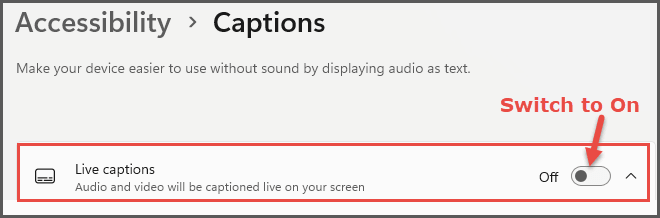
Navigate to Settings > Accessibility > Captions and turn the switch under Live Captions to On
Alternatively, use the keyboard shortcut Windows key + Ctrl + L
When you enable Live Captions, a bar will display across the top of the screen; click Continue, and a small speech pack will be downloaded. The download only takes a minute, and when completed, you’ll be good to go.
Live Captions Customizations
Each time you start Live Captions, that same bar will display across the top of the screen, including a cog icon at the far right, which, when clicked, opens a settings menu. From the settings, you can position the captions above or below, choose different colors, and change the text size.
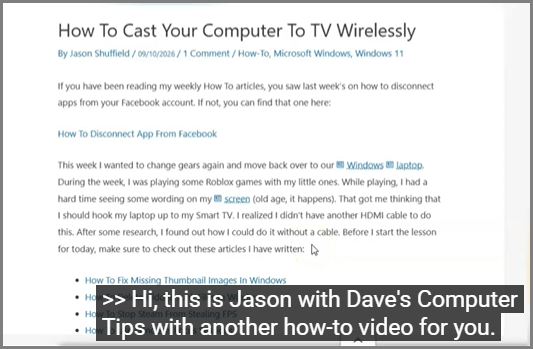
I left mine at the default, which is large white text on black displayed below, and it suits me just fine.
I took a screenshot from one of Jason’s excellent YouTube videos to show you how the default captions display:
If you haven’t seen Jason’s excellent range of videos on YouTube, you can view them at: Daves Computer Tips YouTube.
While you’re there, if you like what you see, make sure to subscribe so you’ll never miss another of Jason’s videos.
BOTTOM LINE:
The Live Caption feature in Windows 11 is well worth checking out, whether you’re watching videos, movies, the latest news, whatever. Especially if your hearing isn’t quite what it used to be, your PC speakers aren’t up to scratch, or you don’t want to disturb others in the household.
Give it a try!
—
