

Microsoft has acknowledged that a bug in Windows 11 is consuming mega amounts of storage space, up to 500 GB in some cases.
The bug is linked to Capability Access Manager, which continues to fill the system drive until it runs out of storage. The file in question is CapabilityAccessManager.db-wal, which is located in the following directory:
C:\ProgramData\Microsoft\Windows\CapabilityAccessManager\
However, you cannot access the file directly, as trying to do so will throw up an “access denied” error, and I do not recommend changing ownership or permissions merely to confirm if it’s eating up storage.
There are lots of methods explained online on how to check the file, but I found the simplest and most accurate method is to use a disk space analyser such as WizTree. There is a portable version of WizTree available, and that’s what I used to check the file.
How To Check CapabilityAccessManager.db-wal
- Download WizTree portable, extract the contents, and run as Administrator
- Scan the system drive (usually “C”) with WizTree
- In the results, dig down to C > ProgramData > Microsoft > Windows > CapabilityAccessManager
- And check the size of the CapabilityAccessManager.db-wal file
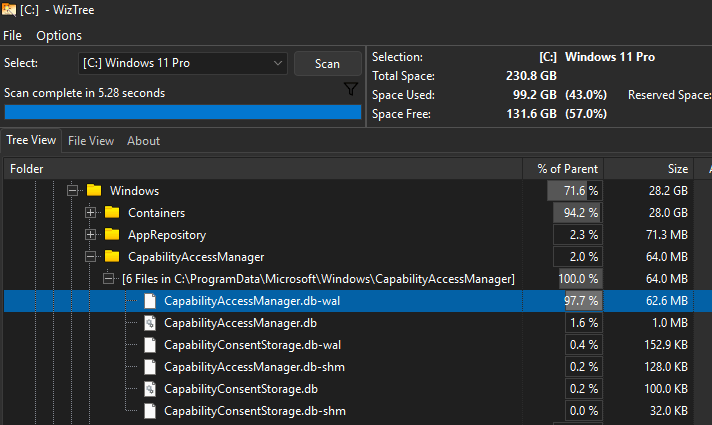
As you can see from the above screenshot, the file in my Windows 11 weighs in at a mere 62.6 MB, so my system is unaffected. If the file in your system is measured in GBs and/or keeps growing every few minutes, your system is likely affected.
Remediation
If your system is affected, the safest fix is to install Windows 11 KB5095093 from Windows Update or apply the July 2026 Patch Tuesday update, where the fix is expected to roll out automatically.
If your system drive is already overly full, to the point where the update cannot be installed, the workaround is to rename the oversized CapabilityAccessManager.db-wal file from within Windows Recovery Environment or Safe Mode, and then let Windows regenerate a fresh WAL file
BOTTOM LINE:
Not everyone is affected by this bug, and it depends largely on individual software configurations. However, if you find that your storage space is fast disappearing, then this is likely the cause.
—
