

Previously only supporting Android mobile devices, the Samsung Browser is now available for Windows PCs.
Samsung Browser Privacy

Samsung is yet another browser claiming to put “privacy first”, and its privacy settings do appear to back up the claim:
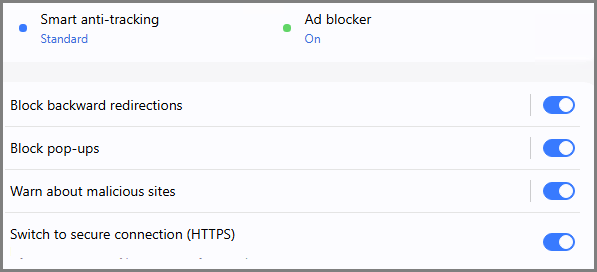
As you can see from the above screenshot, Samsung Browser’s privacy settings include anti-tracking, an ad-blocker, redirection mitigation, and a pop-up blocker. As well as security features such as a malicious site warning system and HTTPS everywhere.
In order to check the effectiveness of these privacy measures, I ran Samsung Browser through Cover Your Tracks (CYT) with the following results:
First, a warning:

Followed by CYT’s scan results:

As you can see, blocking trackers was only partially effective, and there is no anti-fingerprinting feature at all. A “unique” fingerprint is not good, meaning that the fingerprint can be used to track your online activity.
I’m sorry to harp, I know I’ve said this many times over, but a browser without any anti-fingerprinting measures cannot claim optimum privacy. As far as I am aware, the only browser at this time that does include an effective anti-fingerprinting feature is the Brave browser.
Samsung Browser AI & Search
The browser includes an AI assistant developed in partnership with Perplexity, which is context-aware and analyzes content on the active webpage to provide responses relevant to what is currently displayed. Its capabilities include:
- Using natural language rather than keywords or dates when searching browsing history
- Jumping to specific timelines within videos
- Generating structured plans or summaries
- Simultaneously summarizing and comparing content across multiple open tabs
At this point in time, there doesn’t appear to be any options to disable AI features.
Unlike most mainstream browsers, which provide a dropdown list of multiple available search engines to choose from, the only search engine available natively in the Samsung Browser is Google. However, other search engines can be added manually.
Samsung Browser Sync
Syncing Samsung Browser across multiple devices is the feature that will likely appeal to Android users the most. By connecting their Samsung mobile devices with desktop installations, users can pick up where they left off on webpages across devices.
The browser also supports Samsung Pass, which securely stores sign-in credentials and personal information across connected devices.
Other features include a Side Panel, Tab Manager, and Secret Mode (similar to Incognito and Private Mode)
BOTTOM LINE:
In its current form, I doubt the Samsung Browser will make substantial inroads into the PC browser market share. However, as I mentioned earlier, it’s likely that the sync feature will appeal to Samsung mobile users.
- For more details, plus a direct download link, visit: Samsung Browser For Windows
—
