

Windows 11 has added a new feature for users to quickly check their internet speed from within the operating system.
How To Quickly Check Internet Speed
- Right-click the network icon in the notification area of the Taskbar
- From the menu, select Perform speed test
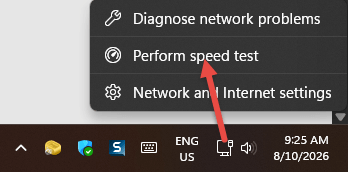
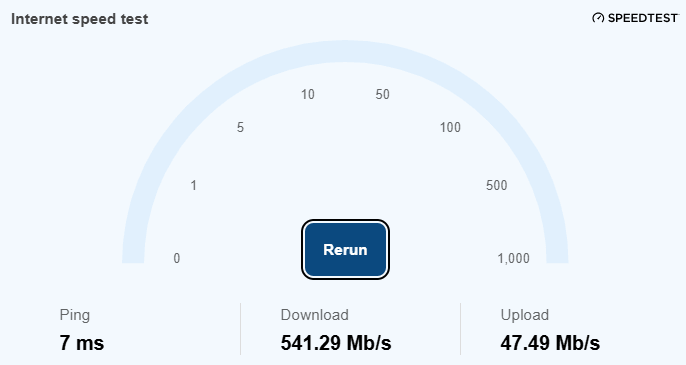
The speed test will instantly open on the desktop for you to check your current download speed, upload speed, and ping without the need for any additional software or hunting down a speed-checking website.
(Windows 11 speed test results)
To check on accuracy, I also ran a speed test via the popular Ookla speedtest website:
(Ookla speed test results)
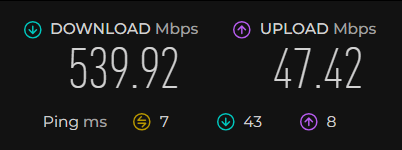
As you can see, the results are very similar, which, considering speed test results will generally vary slightly, even when testing through the same service, suggests that the Windows 11 speed test is pretty accurate.
At least this feature has been delivered to my Windows 11 26H2 machines. I’m still waiting for the other new Windows 11 features to arrive.
—

Internet Speed Test does not appear on my Windows 11 26H2 machine (HP laptop). So I will continue to use Ookla Speedtest.
Hey Elliott,
Microsoft is rolling out these features “gradually”, which is a pain, but you will get it eventually.
I’ve used a speed tester called “speedof.me” and it seems to be within a couple of mbps of the newly built in W11 tester.
Hey Jerry,
Thanks for sharing that info, appreciated.
Nice find Jim. Was able to uninstall Ookla as it is one of the options supplied. Hardly need to check my Internet Speed as my IP connection is very reliable, Mindblower!