


Have a problem with HP All-in-One PC not booting up in Win 11, asking for Bitlocker recovery key number. Have no idea where that is or how to find it. HELP!! Typing this on another pc Win10

August 9, 2011


Oh dear, that's not good.
First off, you'll need to get into Advanced Startup/Recovery mode, as per the attached screenshot.
Try this; restart the PC and as soon as the manufacturer's logo appears (and before the OS starts to load) press and hold the power button in to power down. Repeat that process 3-4 times and it should automatically boot into Advanced Startup/Recovery mode.
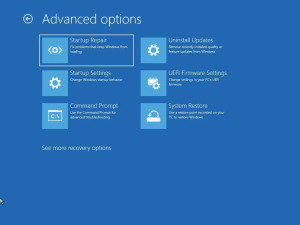

Let us know if you can get into Advanced Startup/Recovery mode as per the attached screenshot and we can take it from there.


Thanks for reply,yes that comes up and it goes through the operation, then also auto goes through Diagnose, then continues to enter Bitlocker recovery number, 28 digits it is, evidently. Now stuck because it can't find that serial number? I have searched Google for a few suggestions there, so I will try those. I have to log in to Microsoft account, then go to the Akas recovery website or something like that. This is the only way to find it this way...driving me nuts. Will keep you posted.


1 Guest(s)
