

The recent trend of major companies pushing AI down users’ throats has seen many users develop an intense dislike for anything AI. It’s a shame because AI can be helpful in many situations, but in my opinion, these companies only have themselves to blame.
Firefox & Perplexity AI

As reported previously, Firefox now includes Perplexity AI as a search option. Personally, I believe the addition of Perplexity search is a plus. However, if you’re fed up with being bombarded with AI, or consider AI as unnecessary bloat, Mozilla has included simple options to disable or remove Perplexity search altogether.
Disable Or Remove Perplexity
- Open Firefox’s settings and click Search (in the left-hand panel)
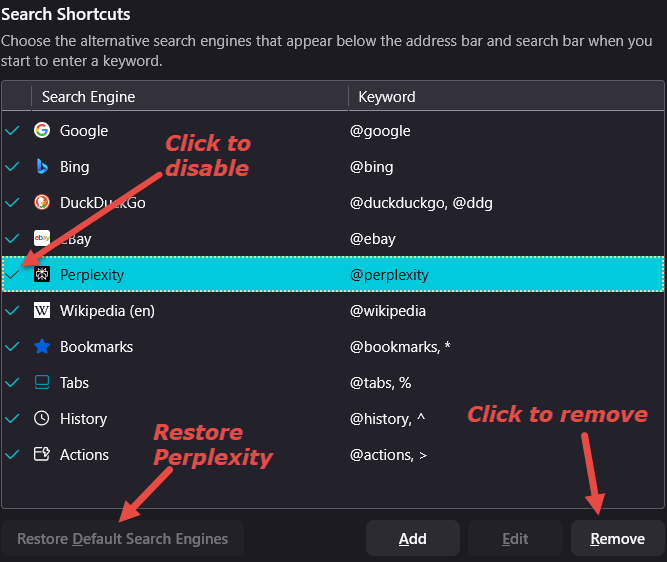
- In the main panel, go to “Search Shortcuts”
- To disable Perplexity, remove the adjacent tick by clicking on it
- To remove Perplexity, highlight the Perplexity option (click on it) and then click Remove
BONUS TIP: To enable Perplexity again, simply click the adjacent space (where the tick was previously) to bring the tick back. To reverse the removal, click the Restore Default Search Engines button.
BOTTOM LINE:
In my opinion, Mozilla’s implementation of Perplexity search is perfectly fine; it’s merely an option, creates zero additional overhead, and is simple to disable or remove.
That said, I can appreciate and understand why users might be fed up with the incessant AI bombardment to the point where anything AI is seen as an anathema.
- To view all Firefox-related articles, visit: Firefox On DCT
Will you be keeping Perplexity search or disabling/removing it? Let us know via the comments.
—
