

One of the first problems I had with my TiVo cable service was that the batteries in my remote seemed only to last a week. I got in touch with Tech Support, and they only sent me a new remote.
When you move or shake this remote in the dark, the buttons will light up. Good or bad, up for debate. I was convinced that this was one of the reasons why the batteries drained so quickly.
I don’t really need that feature, so I disabled it. Here’s how…
To Turn It Off
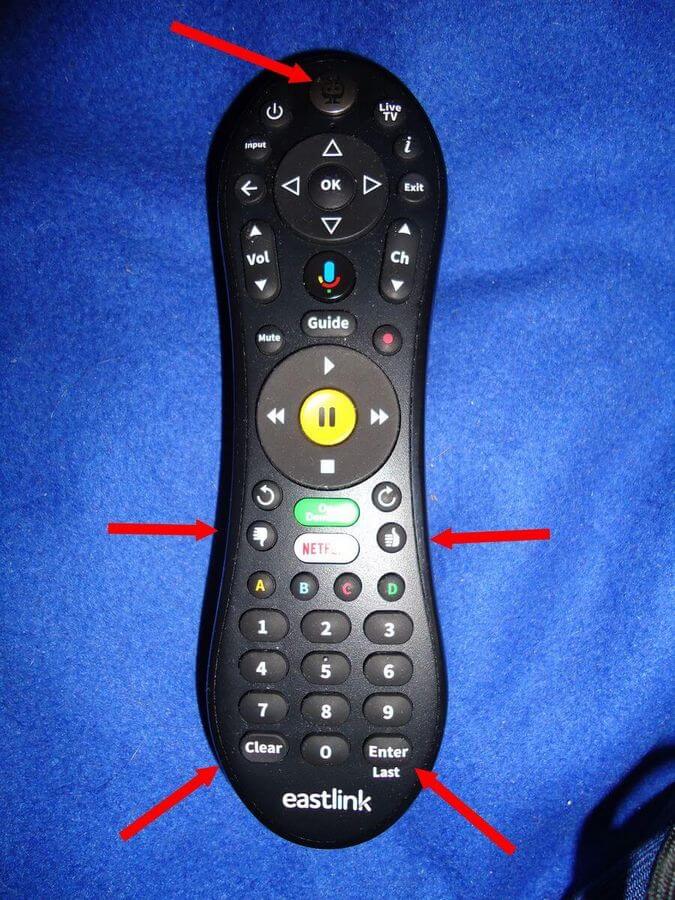
Press and hold the “TiVo button” and the “Thumbs down” button at once. Watch the “activity light” at the top of the remote, just above the TiVo button. It flashes “red” three times. Then press the “Clear” button.
It was a bit tricky for me. I had to try it a few times to get it to work. But it works.
To Turn It On
Press and hold the “TiVo button” and the “Thumbs up” button at once. Watch the “activity light” at the top of the remote, just above the TiVo button. It flashes “red” three times. Then press the “Enter” button.
For more TiVo articles, click here.
—

The fix would be to make the remote rechargeable like the new Roku remotes. When not in use , simply plug it in and done. No need to worry about batteries anymore.
I agree.