

Here are a couple of Windows tricks that I pretty much guarantee you don’t know about.
Slide To Shutdown
This trick creates a one-click option to quickly shut down the PC, and it’s achieved via an obscure file that’s been tucked away in the System32 folder for many years:
- Right-click the desktop and select New > Shortcut
- Type in slidetoshutdown.exe and click Next
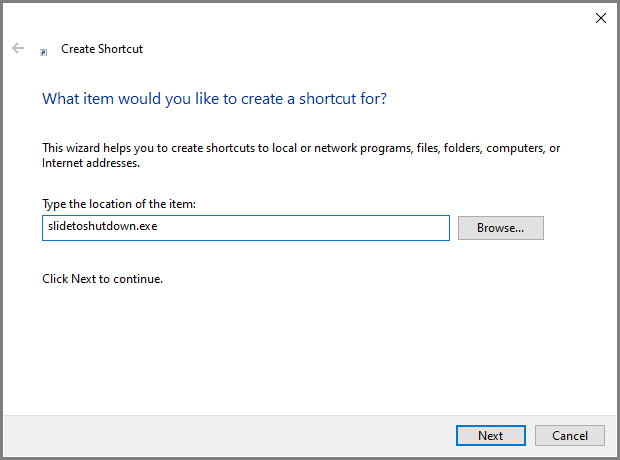
- Name the shortcut something appropriate, such as “Slide to Shutdown” or just “Shutdown”
- Click Next and then Finish
Now, when you double-click the new shortcut, a “shade” will drop halfway down the screen. Slide the shade down with the mouse to shut down the PC.
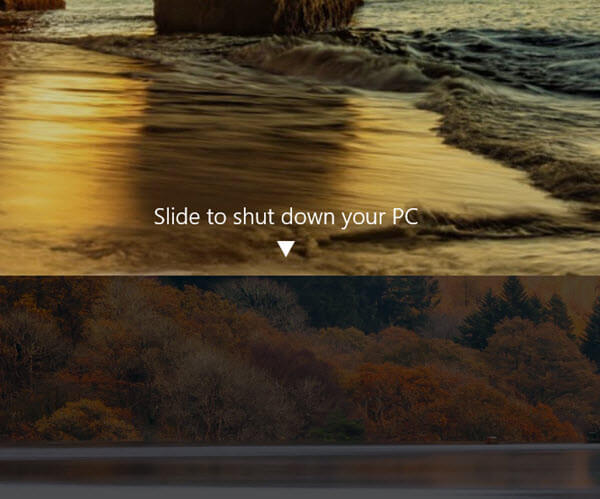
I realize that, in terms of productivity, this trick isn’t all that helpful, but it is something that, when family and/or friends see it, will almost certainly increase your PC cred. 🙂
Frozen Desktop Fix
This is one of those tricks that isn’t guaranteed to work but is worth a try before proceeding to a more drastic solution:
We’ve all experienced a situation where everything appears to be frozen, and the mouse cursor won’t move. Next time this happens, try hitting the keyboard combination: Windows key + CTRL+ SHIFT+ B.
This will restart the graphics driver and potentially return the system to an active state, without needing to perform a hard shutdown. You’ll hear a short beep, the screen will flicker momentarily, and then hopefully, you’ll be able to start working again with a responsive system.
—

Thank you for the info about Fortect. It will save many who read your article.
Always excellent tips, Jim! Much appreciated, sir!
Thanks Jim – that’s a very fancy looking shutdown I had never seen before. Had to try it immediately and although you didn’t say so, if you raise the blind again it cancels the shutdown and isn’t just an immediate irreversible action to shut the PC down which is great if you suddenly change your mind 🙂
For any of your followers who are interested I have been using software called “Winhance” and the one-man developer (“Memory” is his online moniker) is very responsive to improvements and sorting any bugs found by users. It allows you to save a lot of time to safely debloat your new or existing Windows installation and strip it of all the “Microslop” as I understand it is now being termed – all of those rubbish Microsoft apps as well as CoPilot that Microsoft try to force down our throats and a lot of the telemetry, advertising and the “on by default” options that just waste our time and compute cycles and contribute nothing to the computing experience. In addition it will install your choice of the many standard programs that many of us need on a PC installation and save you time and effort of hunting them all down and downloading and installing them yourself.
I was so impressed I made a financial contribution to Memory’s development costs – but the software is totally free if you don’t wish to. I won’t put a link to it as may be against your DavesComputerTips rules but a simple search for “Winhance” will find it. I recommend watching his explanatory ongoing YouTube videos as the software does a lot of things and he provides easy to understand explanations. It seems to be very stable and am using it on two of my machines. Yes it runs some scripts on your PC so a level of trust is involved but everything it is doing is clearly explained and to achieve the same manually would take forever. Of course I made an full backup image first that I could revert to if I wanted. You can save and load your favorite configurations of the “Winhance” settings so you could apply the identical settings again on a reinstall or if you have more than one machine to configure.
I’d be interested to hear your thoughts on it in due course. It certainly serves to make our lives easier dealing with the slop Microsoft is currently feeding us !
Cheers
Reg
“although you didn’t say so, if you raise the blind again it cancels the shutdown”
Yep, moving the blind up cancels the operation. If I divulge all Reg it won’t leave anything for others to discover for themselves, as you did. 🙂
I’ll check out Winhance. There are quite a few of these Windows debloat scripts around, I’ve been looking at one that removes all the AI from Windows.
Posting links is fine. We check them all out anyway to make sure they are safe, and we’ll either delete them or allow accordingly.
You said: “Now, when you double-click the new shortcut, a “shade” will drop halfway down the screen. Slide the shade down with the mouse to shut down the PC.”
Well, I have been using a shutdown shortcut for years that requires just one click to shut down – no double-click (of course, I have set it up for one-click) or sliding.
I created a short tutorial on the Slide to Shut Down tip some time ago.
Thanks for the reminder. I never added it to my new Computer until now.
Thank you, Reg Watson for Winhance.
I’ll second that.
I’ve checked Winhance out and must say I am impressed. A Winhance review will be published soon, stay tuned!
I created a shortcut with the following target:
C:\Windows\System32\shutdown.exe /s /t 00
No sliding here. Just a quick touch.
Yes Harry, that one’s been around for a very long time. We published an article way back in 2012 explaining how to create that shortcut in Windows 8.
BUT, you’re missing the point mate, the whole idea is to get that fancy blind happening so you can dazzle family and friends with your brilliance. 🙂
Thanks for Winhance! How didi I miss that gem?