

For months, I’ve been reading about a new Start menu in Windows 11 but hadn’t seen it in either of my Windows 11 systems… until now.
The new Start menu was installed on one of my Windows 11 machines yesterday, and now I’m not sure if it might have been better for it to remain unseen. It’s large, very large. By my calculations, around 50% larger than the old Start menu:
(on a 27″ monitor)
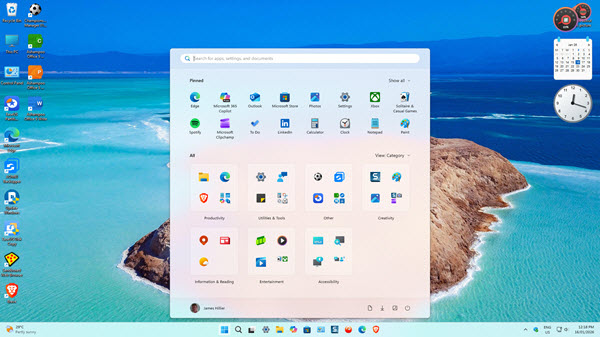
The new Start menu is divided into three sections, from top to bottom: Pinned, Recommended, and All (I have the recommended section disabled). The “All” section, which previously required an additional click to access, lists applications in categories, but that can be changed via a dropdown menu to “List” or “Grid”:
- List View: presents a traditional list of all applications in alphabetical order, with applications listed vertically under each letter of the alphabet
- Grid View: presents a similar list, except applications are listed horizontally under each letter of the alphabet
It is fairly customizable, but the overall size of the Start menu cannot be altered. The size will adapt to the default screen resolution and cannot be set by the user.
The new Start menu in Windows 11 began shipping in October 2025 and has just arrived on one of my Windows 11 machines. My second Windows 11 machine is still waiting. So, it is obviously a slow rollout. If you haven’t seen the new Start menu as yet, don’t panic, you should be seeing it soon.
BOTTOM LINE:
I’ve always said that Windows 11’s Start menu is the worst Start menu ever, and I’m pretty sure this new Start menu is not going to change that opinion. I guess time will tell.
—

The new Start menu is a shift from “busy and loud” to “calm and intentional.”
It respects your attention instead of competing for it — and that’s a refreshing design philosophy.
Seriously!? It looks pretty much the same as the old Start menu to me, except very much larger.
Still haven’t seen it on my machine