

VLC on my Android TV started OK, but it can have its issues at times. It requested my Network password even though I was already using it. I put it in my password. But it keeps popping up, and I can’t even cancel it. I have to go through the TV settings and force VLC to stop.
A message would pop up occasionally. It would go by too fast to read, but it did suggest that smb couldn’t find a location …. or something.
A few suggestions online include checking the username and password. I did it, and it was accurate. I tried to update it, but no updates were available. I uninstalled it and reinstalled it. It still didn’t work.
The suggestion that worked was to disable the SMB1 option in VLC…
Open VLC.
Navigate to the word “Other” down the orange side and then navigate over to “Settings”.
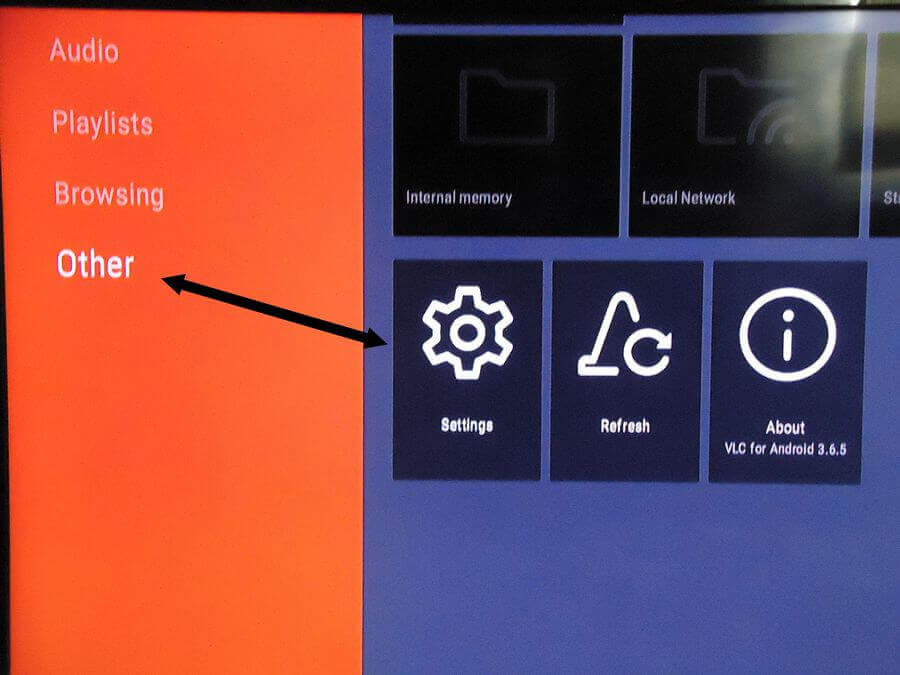
Go into Settings. Scroll down to “Advanced” settings. It’s the last item on the list.
Remove the check mark from “Prefer SMB 1”.
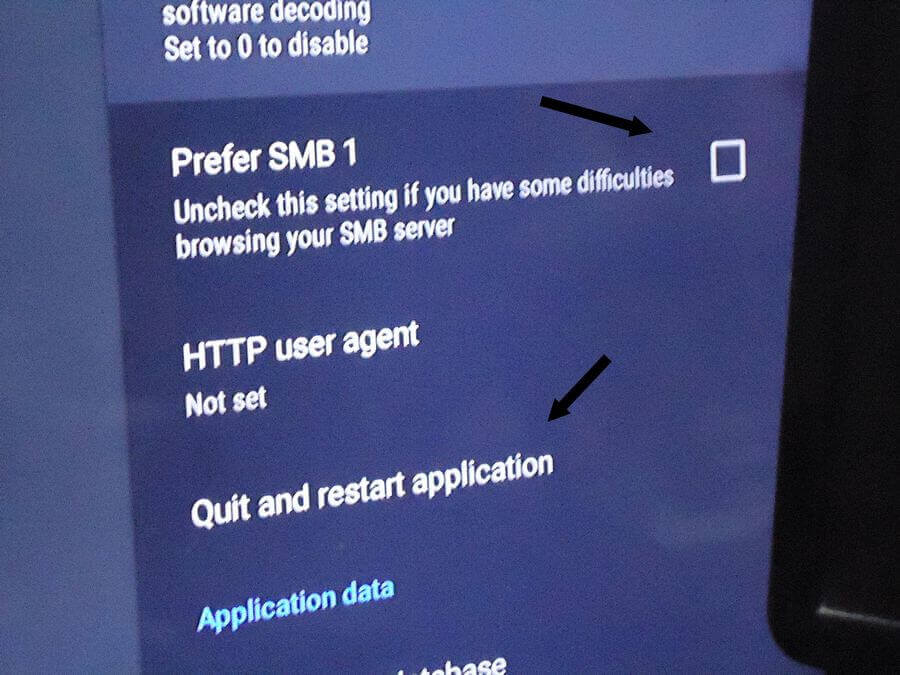
Then click on “Quit and restart application”. It would not save its settings unless I did this.
This is what works for me.
For more VLC articles, click here.
—
