

If you get bored watching your videos, why not turn them into puzzles?
Go to “Tools -> Effects and Filters.”
Click the “Video Effects” tab. Then “Geometry”.
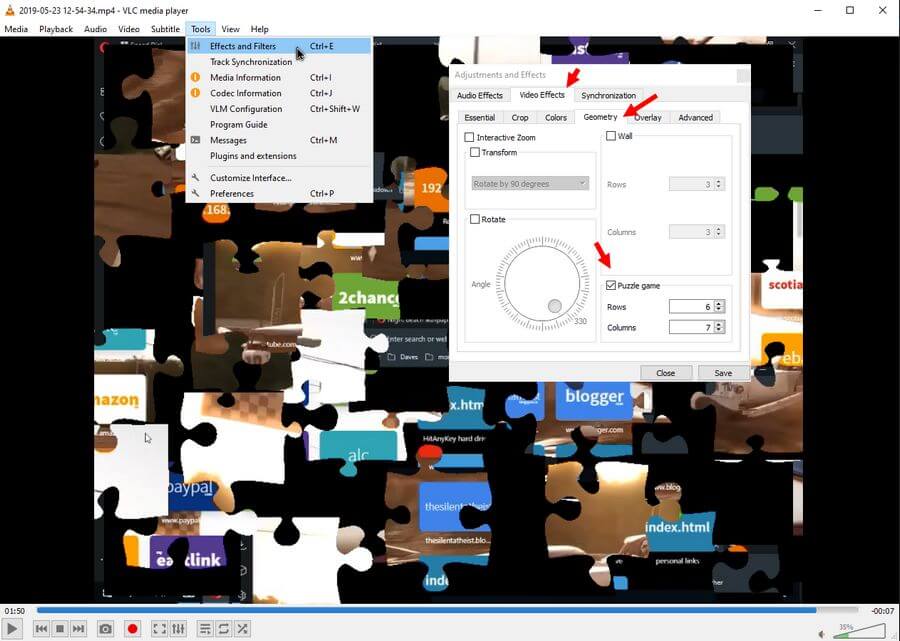
Down in the corner, you should see “Puzzle game”. Check it. You can change the “Rows” and “Columns” if you want. The defaults are 4 and 4.
You can Save it; if you do, every video you open in VLC will be a puzzle. If you don’t save, closing the video and opening it will erase the puzzle, and no other videos will open with the effect.
Now your video is a puzzle. Click and drag the pieces around with your mouse. You can even play the video while doing this.
Keep in mind, these are overlays just for VLC, so every video you play in VLC will be a puzzle if you save it. To undo it, reverse it. Remove the check mark from the Puzzle game and save.
Note: This doesn’t change anything on your videos, just how they display in VLC. You can confirm this by opening up your video in another media player.
For more VLC stuff, click here.
—
