


February 24, 2019


Maybe, I can find the answer from the meeting of minds here, though I have been scouring the web for months, to no avail. I did run the Search troubleshooter and rebuilt the index, unsuccessfully, and tried many of the recommended remedies on the Web, turning out to be futile. How can I fix this absolutely infuriating evil PERMANENTLY?
Jim Hillier said:
We would need more information about your setup:
What is the make and model of your CPU (processor)?
What RAM is installed- 4GB, 8GB, 16GB?
Have you tried running Task Manager while that infernal green progress line is crawling across? Task Manager will show you what processes are consuming resources- CPU, RAM, and disk.
We can provide more help over on the Forum. The Forum is a far better medium for helping with these types of issues. You can post screenshots on the forum, so we can see exactly what’s going on.

August 9, 2011

Hey Harry,
Thanks for that additional info. Now, can you please let us know what type of main drive (system drive, usually C drive) you have, is it an HDD or SSD? Also, please let us know the size of that drive and how much free space?
Do you have some sort of screen capture software so you can show us screenshots?
Cheers... Jim


February 24, 2019

Sorry for the delay. Being retired is busier than when I was working!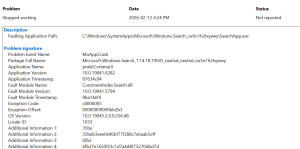

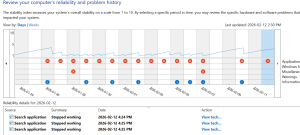
It is 1 TB HHD of which I have partitioned 85 GB for the OS and 845 GB for data. The C: drive has 34.8 GB space left.
Here are two screenshots from Windows Reliability.
February 24, 2019
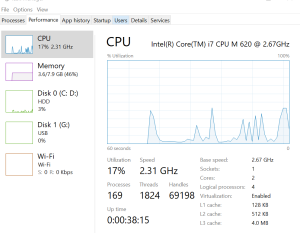
August 9, 2011
Hey Harry,
The mention of "Cortana" in the event error report is a tad concerning. Microsoft removed Cortana quite some time ago.
What version of Windows are you running... 10 or 11? And what build... 22H2,23H2,24H2,25H2?
Did you take the screenshot of the Performance tab under Task Manager while the issue was occurring, with the progress bar crawling across?
If not, please replicate the issue, then take a screenshot of the performance tab under Task Manager while the issue is occurring and post it back here.
Also, you mentioned that you've tried lots of possible solutions with no success, it would be extremely helpful to know what you've already tried... if you can remember. 🙂
I assume you've already tried running the DISM > RestoreHealth and SFC / scannow commands?
There are so many potential causes for this error, it's going to be very difficult to diagnose without hands on access.
Cheers... Jim


